HIPAA Compliant PDF Forms

Turn Your Existing PDFs into Secure, Fillable Online Forms

Already have PDF forms your practice uses every day? Keep them. FormHippo lets you upload your existing PDF documents and turn them into secure, HIPAA compliant PDF forms that patients can complete and sign online from virtually any device.

FormHippo’s full-featured PDF editor lets you edit your existing documents, add text and pages, and place fillable text fields, checkboxes, radio buttons, dates, electronic signatures, and other form elements directly onto your PDFs. When your form is ready, simply publish it and FormHippo provides a secure web link and QR code you can share with patients or add to your website.

Prefer to build a new form from scratch? Use our HIPAA compliant form builder to create custom online forms with drag-and-drop fields.

No printing, handwriting, scanning, or emailing PDF attachments back and forth. Patients open the form in their browser, complete the required fields, electronically sign when needed, and securely submit the finished form through FormHippo.

See How Easy It Is to Create HIPAA Compliant PDF Forms

Play Video about FormHippo PDF editor for creating HIPAA compliant PDF forms

Watch how an existing PDF can be edited, converted into a fillable form, enhanced with electronic signatures, and published for secure online completion with FormHippo.

Use the PDF Forms You Already Have

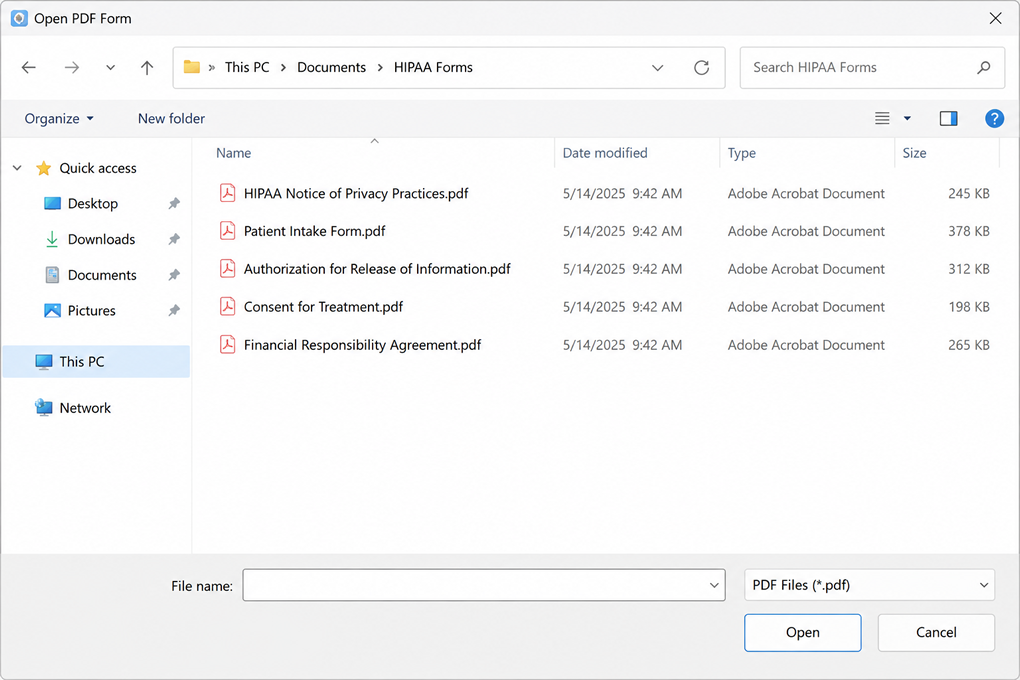
Select an existing PDF to create a HIPAA compliant PDF form with FormHippo
Upload your existing PDF forms to FormHippo to edit, add fillable fields and electronic signatures, and publish them securely online.

Many healthcare practices already have patient forms they use every day in PDF format. With FormHippo, you don’t have to recreate those documents from scratch or replace them with a completely different form design. Simply upload your existing PDF and continue using the familiar layout your practice already knows.

FormHippo turns your existing documents into HIPAA compliant PDF forms that can be edited, enhanced with fillable fields and electronic signatures, and published for secure online completion. This makes it easy to move paper-based workflows online while preserving the forms, branding, instructions, and document layouts you already use.

Edit and Customize Your PDF Forms

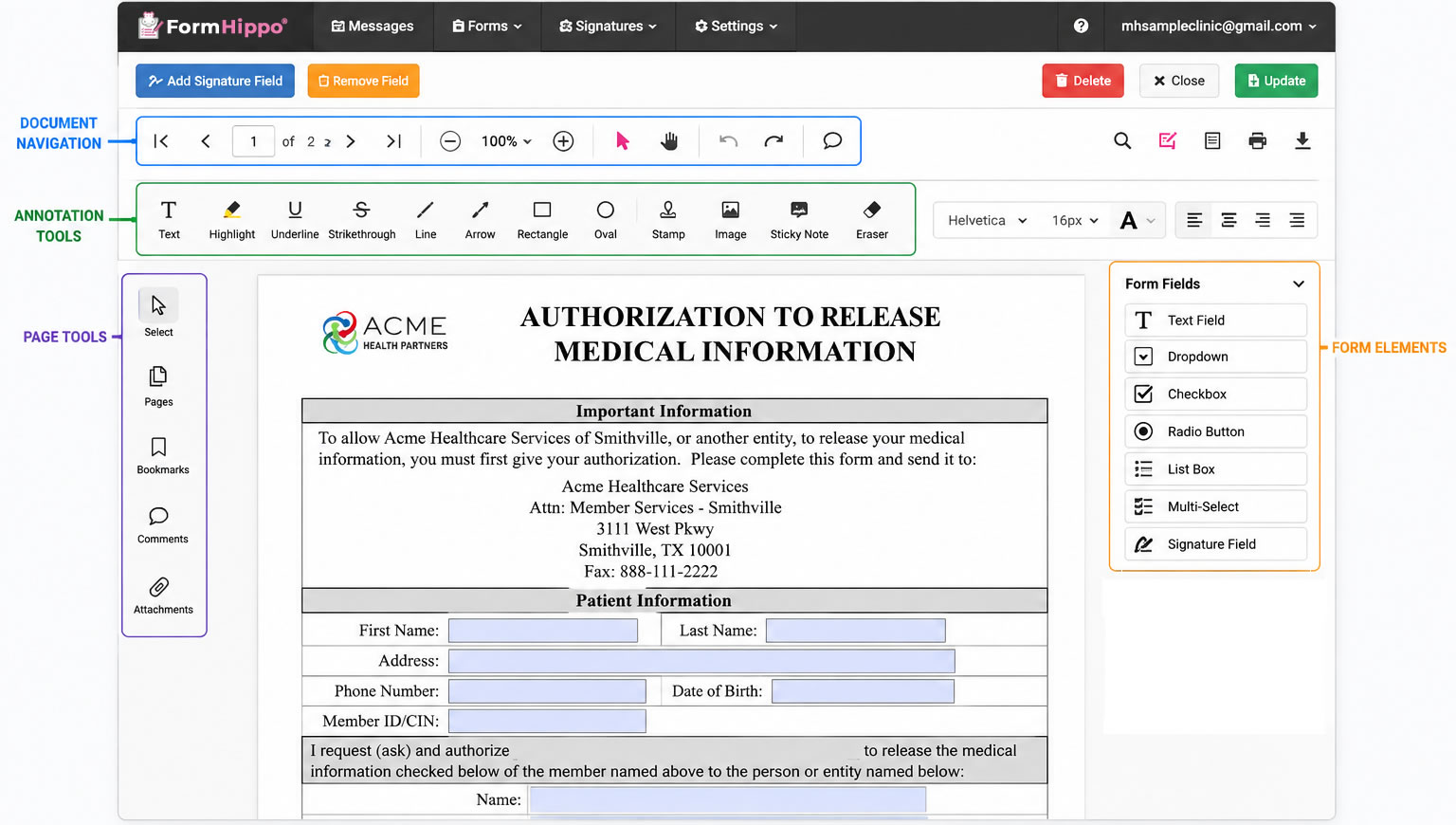
FormHippo includes a full-featured PDF editor, so you can do more than simply add fields to an existing document. Edit or add text, insert pages, make changes to your document, and prepare your PDF for online completion, all without having to modify the original file in separate PDF software.

Once your document is ready, you can add the interactive fields your patients need to complete, including text fields, dates, checkboxes, radio buttons, electronic signatures, and more.

FormHippo PDF editor with annotation tools and form fields for HIPAA compliant PDF forms
Edit and annotate existing PDFs, then add fillable form fields and electronic signatures with the FormHippo PDF editor.

Add Fillable Fields and Electronic Signatures

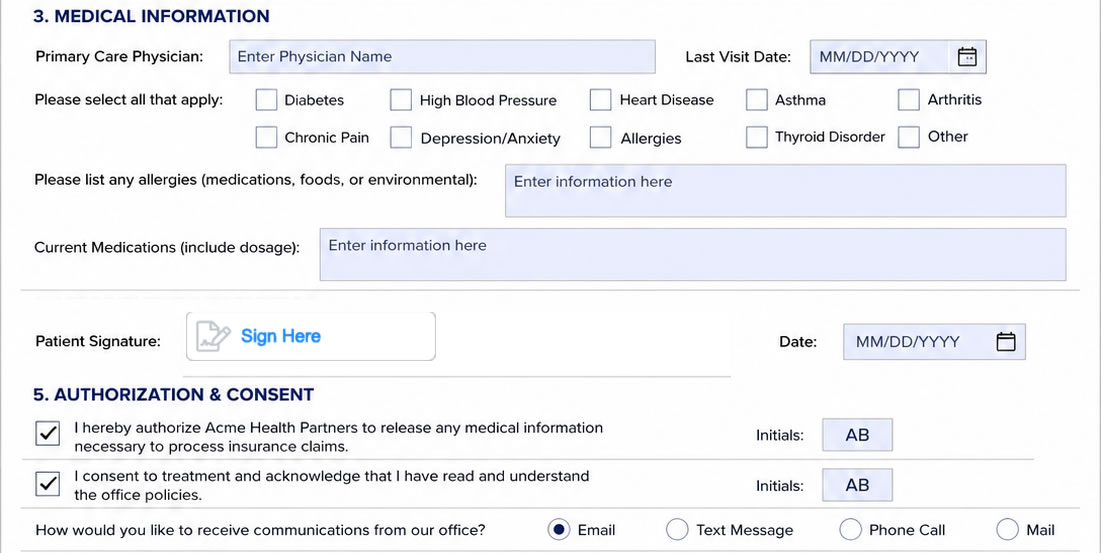
Fillable healthcare PDF form with text fields, checkboxes, dropdowns, dates and electronic signatures
FormHippo lets you add interactive fields, checkboxes, dropdowns, dates, initials, and electronic signatures to existing healthcare PDF forms.

FormHippo lets you turn an existing PDF into an interactive online form by adding the fields patients need to complete. Place text fields, dates, checkboxes, radio buttons, dropdowns, number fields, and other form elements directly onto the document, then add electronic signature fields wherever authorization or acknowledgment is required.

Each field can be positioned and customized to match the layout of your existing PDF, allowing you to preserve the original document while making it easy for patients to complete online.

For forms that require an electronic signature, FormHippo can also verify access to the signer’s email address using a unique security code before signing, adding an additional identity-verification step to the workflow.

Publish and Share Your HIPAA Compliant PDF Forms

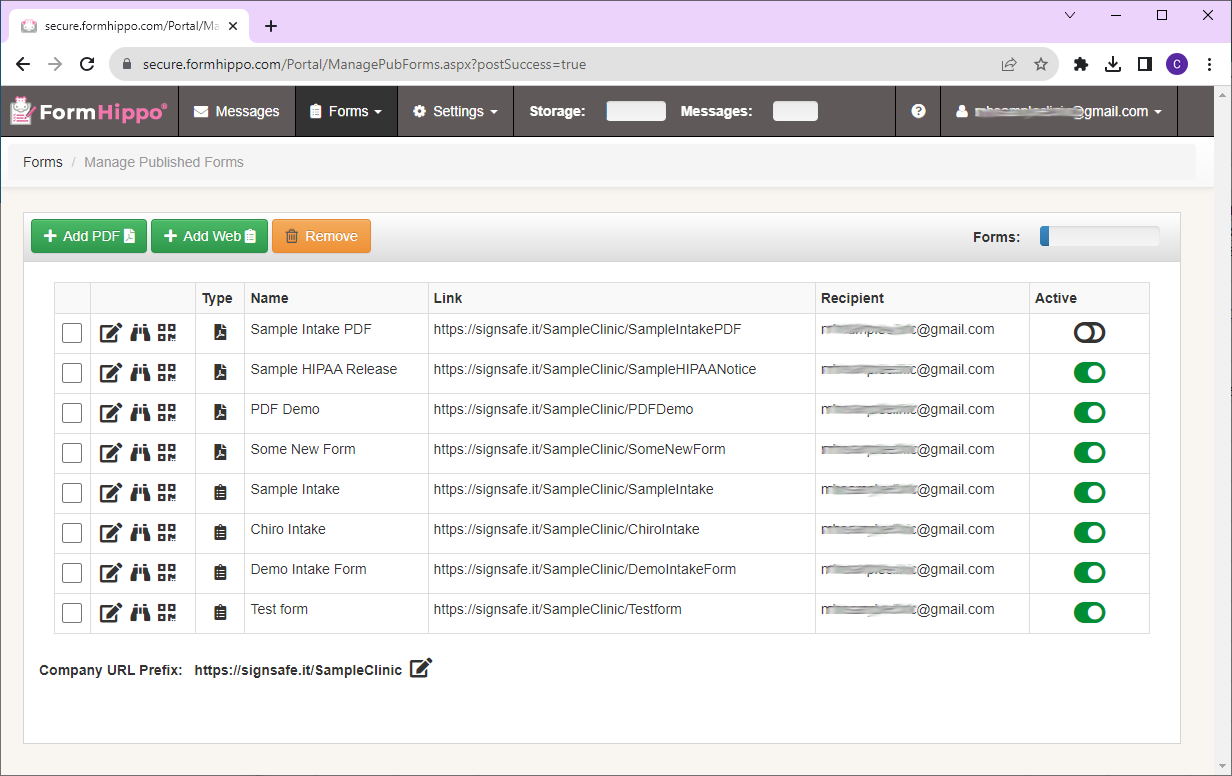
Once your PDF is ready, FormHippo makes it easy to publish it for secure online completion. Each published form receives a unique web link and QR code that you can share with patients by email, place on your website, or provide anywhere you need patients to access the form.

Patients simply open the link or scan the QR code to access the PDF form in their browser.  There’s no software to download or PDF attachment to send back. When finished, they securely submit the completed form through FormHippo.

FormHippo published HIPAA compliant PDF forms with secure links and QR codes
Manage published PDF forms and access secure form links and QR codes for sharing with patients.

Easy for Patients to Complete on Any Device

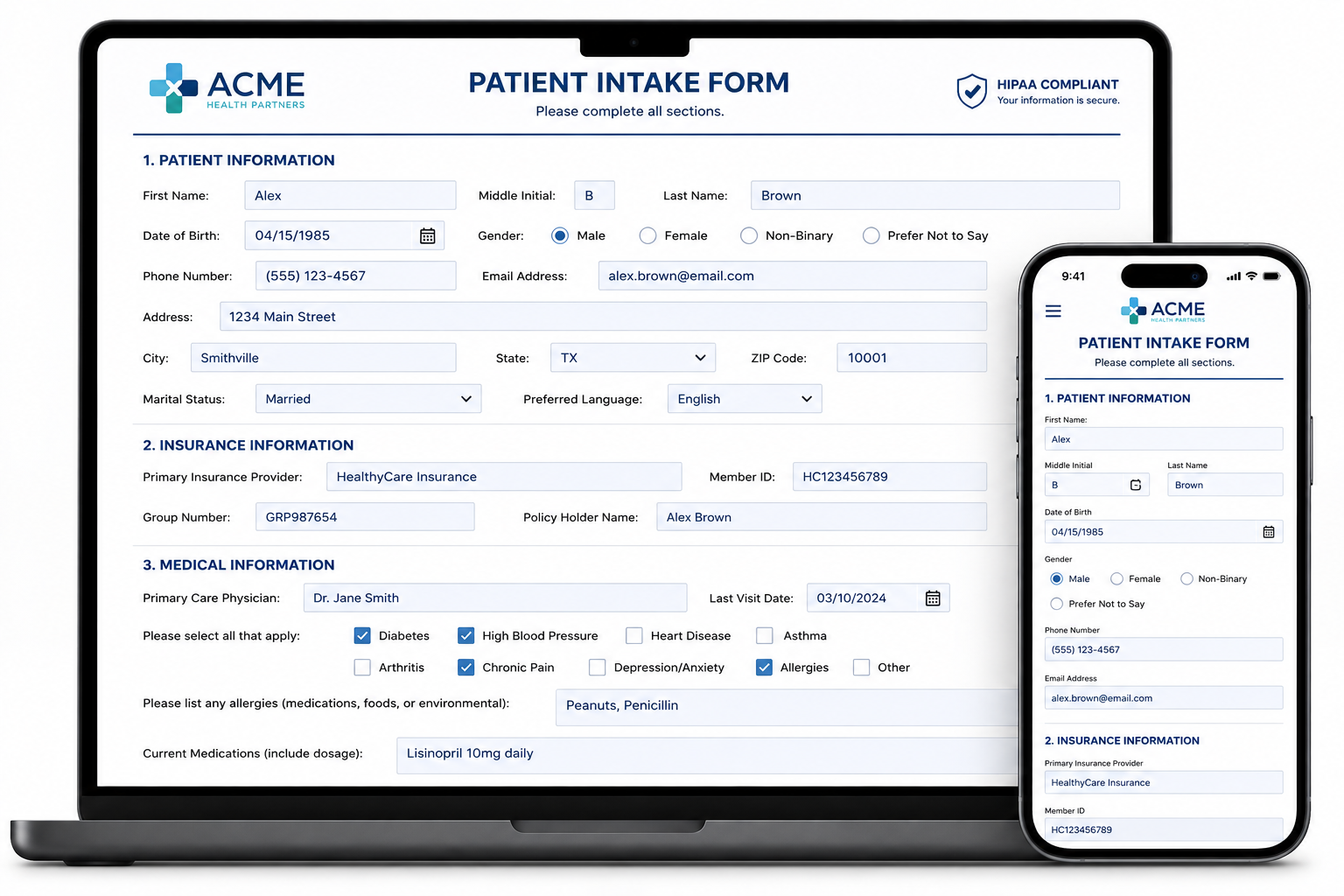
HIPAA compliant PDF form displayed on a laptop and mobile phone for secure patient completion
Patients can securely access and complete FormHippo PDF forms from smartphones, tablets, laptops, and desktop computers.

Patients can open your published PDF form from its secure web link or by scanning its QR code. The form opens directly in their browser, where they can enter information, select options, and add required electronic signatures without downloading special software.

FormHippo makes HIPAA compliant PDF forms easy to complete on smartphones, tablets, laptops, and desktop computers, giving patients a convenient way to submit forms before an appointment or wherever they happen to be.

Securely Collect PDF Forms Containing PHI

When PDF forms contain protected health information (PHI), security involves more than simply putting the document online. FormHippo is designed for healthcare workflows with safeguards that help protect sensitive patient information throughout the form process.

FormHippo uses encryption for data in transit and at rest, access controls, audit trails, and secure submission delivery to help protect information collected through your PDF forms. For healthcare providers and other covered entities, a Business Associate Agreement (BAA) is available during signup at no additional charge.

Learn more about how to make online forms HIPAA compliant and the safeguards involved when collecting PHI electronically.

Encryption

Form data is encrypted during transmission and while stored.

Access Controls

Helps restrict sensitive form information to authorized account users.

Audit Trails

Records access and activity associated with submitted forms.

Secure Form Delivery

Completed forms are securely transmitted through FormHippo rather than ordinary email attachments.

BAA Included

A Business Associate Agreement is available to covered entities during signup at no additional charge.

Common HIPAA Compliant PDF Forms for Healthcare

Healthcare practices use PDF documents for many different patient workflows. FormHippo lets you take the forms your organization already uses, add fillable fields and electronic signatures, and publish them for secure online completion.

Common examples include:

  • Patient Intake Forms – Collect demographics, contact information, insurance details, medical history, and other information needed before a visit.
  • HIPAA Authorization Forms – Obtain patient authorization for permitted uses or disclosures of protected health information.
  • Release of Information Forms – Allow patients to request or authorize the release of medical records and other health information.
  • Consent for Treatment Forms – Collect patient acknowledgment and consent before providing treatment or services.
  • Notice of Privacy Practices Acknowledgments – Document patient acknowledgment of receiving or reviewing your privacy practices.
  • Medical History Forms – Collect health history, medications, allergies, conditions, and other relevant patient information.
  • Telehealth Consent Forms – Obtain patient consent and acknowledgment for telehealth services.
  • Financial Responsibility & Insurance Forms – Collect insurance information, payment responsibilities, assignment-of-benefits acknowledgments, and related information.

Need a form to get started? Explore our HIPAA compliant form templates for commonly used healthcare forms.

Turn Your Existing PDFs Into Secure Online Forms

You don’t need to replace the PDF forms your practice already uses. With FormHippo, you can upload and edit existing PDFs, add fillable fields and electronic signatures, and publish them as HIPAA compliant PDF forms that patients can securely access and complete online from virtually any device.

From patient intake and consent forms to HIPAA authorizations and release-of-information documents, FormHippo gives healthcare providers an easy way to move existing PDF workflows online while protecting PHI with encryption, access controls, audit trails, secure form delivery, and an available BAA.

Ready to put your existing PDF forms online? Start your free FormHippo trial today.

Frequently Asked Questions

HIPAA compliant PDF forms are PDF documents used to collect or exchange protected health information (PHI) through a system with appropriate safeguards for HIPAA-regulated workflows. FormHippo helps healthcare providers use PDF forms online with encryption, access controls, audit trails, secure submission delivery, and a Business Associate Agreement (BAA) available for covered entities.

A PDF file by itself is not automatically HIPAA compliant. When a PDF is used to collect PHI, the surrounding process and technology must provide appropriate safeguards for how that information is accessed, transmitted, and stored. With FormHippo, you can upload your existing PDF, add fillable fields and electronic signatures, publish it securely online, and collect completed forms within a platform designed for HIPAA-regulated workflows.

Yes. You can upload an existing PDF to FormHippo and add interactive fields such as text boxes, dates, checkboxes, radio buttons, dropdowns, initials, and electronic signatures. This lets you continue using your existing healthcare documents while making them fillable and available for secure online completion.

Yes. Electronic signature fields can be placed directly onto your PDF documents. When signer verification is used, FormHippo can verify access to the signer’s email address with a unique security code before signing, adding an identity-verification step to the signing process.

Yes. If your existing healthcare forms were created in Microsoft Word, simply save or export them as PDF files before uploading them to FormHippo. Once uploaded, you can use the FormHippo PDF editor to make changes, add fillable form fields and electronic signatures, and publish the finished PDF for secure online completion.

Yes. FormHippo includes a full-featured PDF editor that goes beyond simply placing form fields over a document. You can add text, insert pages, annotate your document, and add interactive form fields and electronic signatures, all within the FormHippo PDF editor.

Yes. Patients can access published FormHippo PDF forms through a web browser on smartphones, tablets, laptops, and desktop computers. They can open the form using its secure web link or QR code, complete the required fields, add electronic signatures when needed, and securely submit the finished form without installing special software.

When you publish a PDF form with FormHippo, the form receives a unique secure web link and QR code. You can share the link with patients, provide the QR code for scanning, or make the form available through your website. Patients then access and complete the form online rather than exchanging ordinary PDF attachments.

When a service provider creates, receives, maintains, or transmits PHI on behalf of a HIPAA-covered entity, a Business Associate Agreement is generally required. FormHippo makes a BAA available to covered entities during signup at no additional charge, so healthcare practices don’t need an enterprise-level plan simply to obtain one.

When a patient submits a completed form, FormHippo securely stores the submission within the FormHippo platform and sends an email notification to the user designated as the Recipient. The notification lets the Recipient know that a new form submission is waiting and includes a secure link to access it.

The completed form itself is not sent as an email attachment. Instead, the Recipient follows the secure link in the notification email to access the submitted form within the secure FormHippo platform, helping keep protected health information (PHI) out of ordinary email attachments.

© 2026 MailHippo, Inc.
2637 E. Atlantic Blvd.
#1063 Pompano Beach, FL  33062

View our Privacy Policy or contact our Customer Service team.