HIPAA Compliant Form Builder

Create Secure Online Forms for Your Healthcare Practice

FormHippo’s HIPAA compliant form builder makes it easy for healthcare providers to create, publish, and manage secure online forms without coding. Build a form from scratch with our drag-and-drop editor or start with a ready-to-use healthcare form template and customize it for your practice.

Add text fields, checkboxes, dropdowns, dates, file uploads, electronic signatures, and more. When your form is ready, publish it with a unique web link and QR code so patients can securely complete it from a computer, smartphone, or tablet.

FormHippo is designed specifically for healthcare workflows involving protected health information (PHI), with encrypted data, secure form submissions, access controls, and a HIPAA Business Associate Agreement (BAA) included for covered entities.

No coding. No software to install. Just secure, easy-to-use online forms built for healthcare.

Build Your Form with an Easy Drag-and-Drop Editor

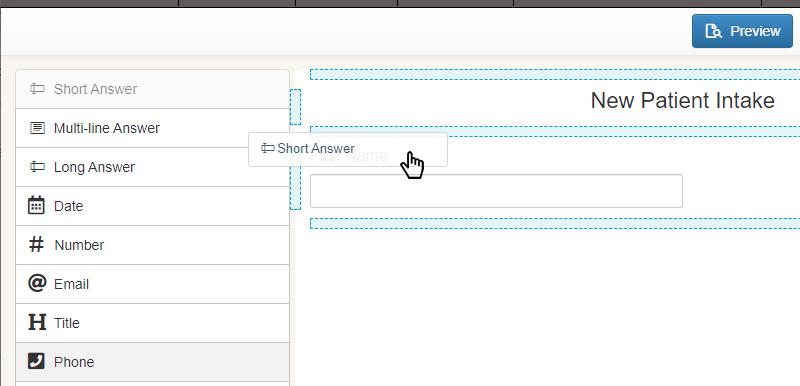
Creating a secure online form with FormHippo doesn’t require coding, technical expertise, or help from a web developer. Start with a blank form or choose an existing healthcare form template, then use the intuitive drag-and-drop form builder to create the form your practice needs.

Simply select the fields you want and drag them directly onto your form. Add short or long text fields, dates, phone numbers, email addresses, checkboxes, dropdown menus, file uploads, electronic signatures, images, and more. Fields can be arranged and customized as you build, giving you complete control over the information you collect and how your form is organized.

Need to make a change? Add, remove, edit, or rearrange fields as your requirements evolve. This makes it easy to create everything from a simple patient contact form to more detailed intake forms, medical questionnaires, consent forms, and other healthcare workflows that may involve protected health information (PHI).

With FormHippo’s HIPAA compliant form builder, you can create professional, secure online forms around the way your practice actually works—without being locked into a rigid, one-size-fits-all template.

Customize Each Form Field

Every practice collects information differently. With FormHippo, you can customize individual form fields so your forms match the specific information and workflow requirements of your organization.

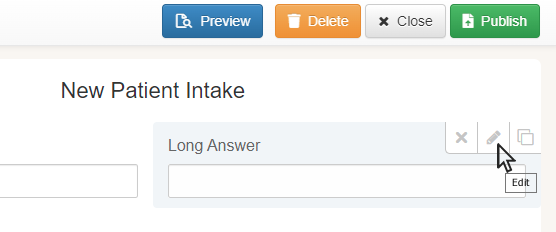
Simply select any field in the form builder to modify its label, instructions, properties, formatting, validation settings, and other available options. You can clearly tell patients what information to provide, determine how a response should be entered, and configure fields based on the type of information you’re collecting.

Fields can also be rearranged as you build your form, making it easy to organize questions into a logical, patient-friendly flow. If your requirements change, simply return to the form builder and update the appropriate fields rather than rebuilding the entire form from scratch.

For example, a patient intake form can be customized to collect contact information, medical history, insurance details, consent acknowledgments, document uploads, and electronic signatures—all within a single secure online form.

This flexibility means you aren’t forced to adapt your practice to a rigid, one-size-fits-all form. FormHippo’s HIPAA compliant form builder lets you create forms around the way your practice actually works, while providing a simple experience for the patients and participants completing them.

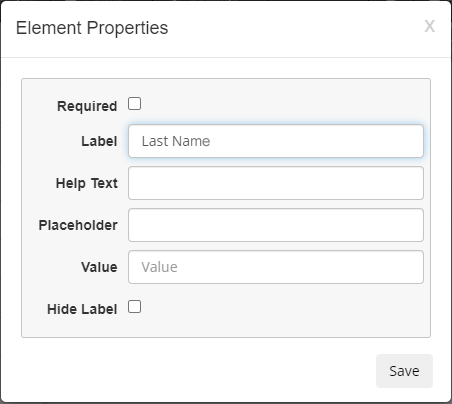
Form field properties
Edit element properties easily with the properties dialog.

Build Forms with the Fields You Need

Every healthcare practice collects different information, so FormHippo’s HIPAA compliant form builder gives you the flexibility to create forms that match your specific workflow. Simply choose the form elements you need and drag them onto your form—you can add, remove, rearrange, and customize fields as your form takes shape.

FormHippo includes a wide variety of field types for collecting everything from basic contact information to more detailed patient information. Add text fields, multi-line responses, dates, phone numbers, email addresses, checkboxes, radio buttons, dropdown selections, images, electronic signatures, file uploads, and more.

This flexibility makes it easy to create many different types of secure healthcare forms, including new patient intake forms, medical history questionnaires, consent and authorization forms, patient registration forms, insurance information forms, release-of-information requests, and other custom forms that may contain protected health information (PHI).

You aren’t limited to a fixed template or predetermined set of questions. Start with a blank form and build exactly what your practice needs, or customize an existing FormHippo template by adding, removing, or modifying fields.

Below are some of the form fields and elements available in the FormHippo drag-and-drop form builder:

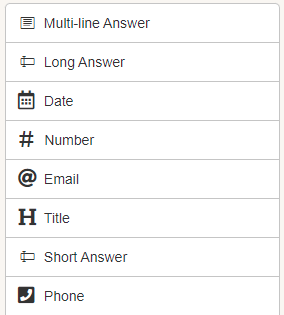
Form builder elements 1-8
Input fields include Short, Long and Multi-Lines, Dates, Number, Phone and Email.
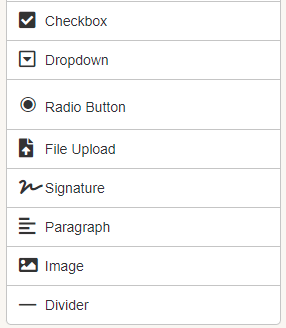
Form elements 9-16
Additional fields include Checkbox, Dropdown, Radios, File Upload, Signature, Images and more.

Publish, Share, or Embed Your HIPAA-Compliant Form

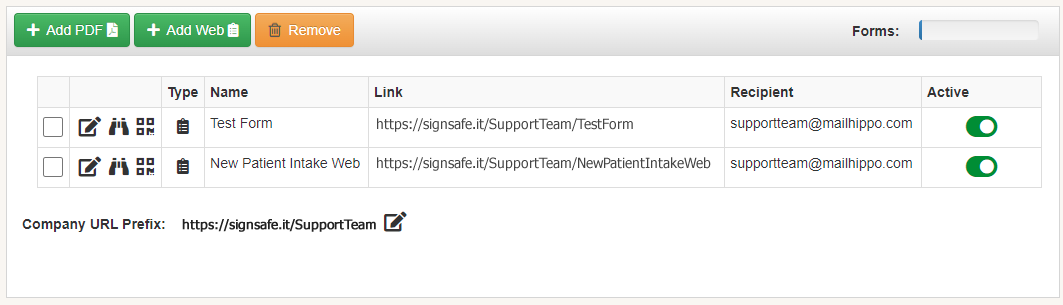
Add and customize the fields you need until your form is ready, then simply click Publish. FormHippo automatically creates a unique, secure web link and QR code for your form, making it easy to share with patients, clients, or other participants.

You can send the secure form link by email or text message, add it to your website, or display the QR code in your office so patients can scan it with their smartphone. Forms are mobile-friendly and can be completed from a phone, tablet, or computer without downloading or installing any software.

Want the form to appear directly on your own website? FormHippo also allows you to embed published forms into your website so visitors can complete them without leaving your site. FormHippo provides the HTML embed code you need, which can be added to an existing web page while the form and submitted data continue to be securely handled by FormHippo.

This gives healthcare practices the convenience of a form that looks and feels like part of their own website while maintaining the security protections provided by FormHippo for collecting and transmitting sensitive information and PHI.

Whether you share a secure link, use a QR code, or embed the form directly into your website, FormHippo provides a convenient way to securely collect patient information, consent forms, medical histories, questionnaires, file uploads, electronic signatures, and other information your healthcare practice may need.

List of published forms
List of published forms along with their web links.

Simple for Patients and Form Fillers

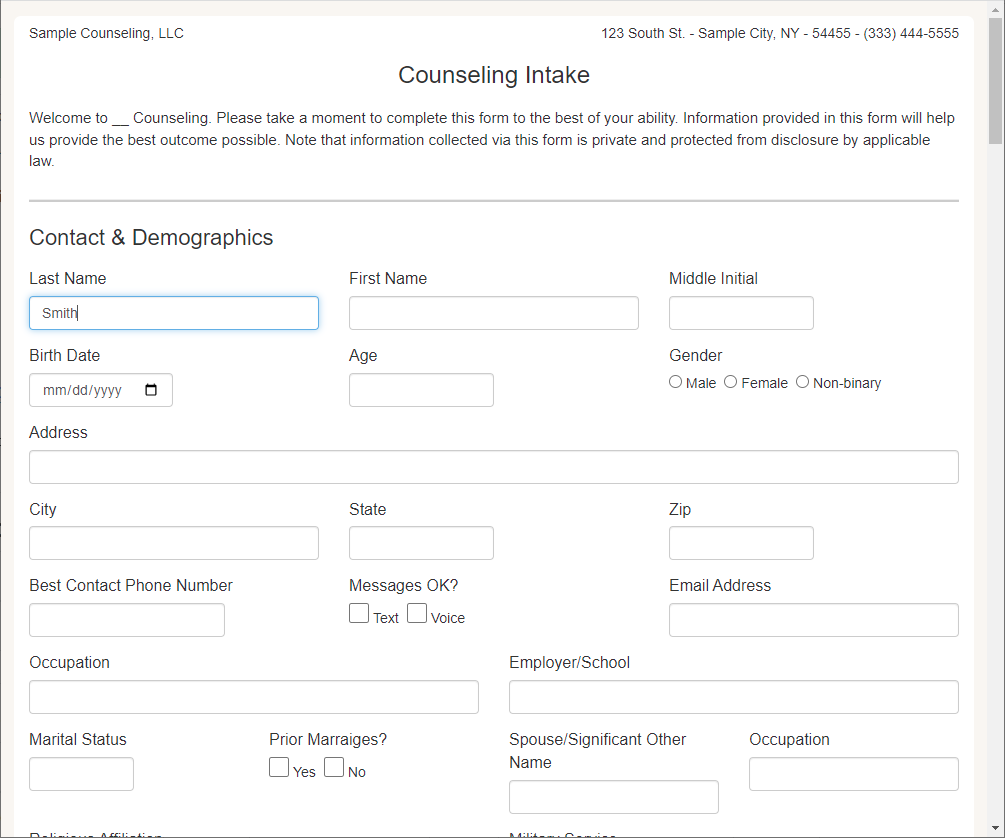
Completing a FormHippo form is just as easy as creating one. Patients or other participants simply click the secure form link or scan the QR code to open the form directly in their device’s web browser.

From there, they fill in the requested information, upload files or add an electronic signature when required, and click Submit. FormHippo forms are mobile-friendly and can be completed from a smartphone, tablet, laptop, or desktop computer.

There’s nothing to download and no app or account to install. Just click, fill, and submit—making it easy for patients to securely complete forms from virtually any device with a web browser.

Patient intake form
New patient intake form

Added Security for Forms with Electronic Signatures

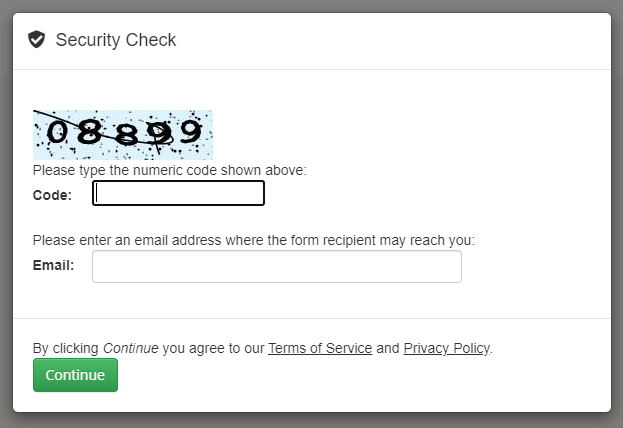
When a FormHippo form requires an electronic signature, an additional security check helps verify the signer before the signature can be completed.

FormHippo sends a unique verification code to the signer’s email address. The signer must enter that code to confirm access to the specified email account before proceeding with the electronic signature.

This extra verification step helps provide greater assurance that the person signing the form has access to the email address associated with the signature request, adding another layer of security and accountability to forms that require electronic signatures.

The verification process happens directly in the browser, so there’s still no software to download and no app to install. The signer simply verifies their email, completes the form, signs, and submits.

Captcha modal for online forms
Security check prior to rendering form.

Get Notified When a New Form Is Submitted

When someone completes and submits a FormHippo form, the form owner is automatically notified at their regular email address, so there’s no need to continually check FormHippo for new submissions.

The notification email lets you know that a new form has been received and includes a link to securely access the completed form. Simply click the attachment link in the notification email to open and view the submission.

To help protect sensitive information and protected health information (PHI), the completed form data itself is not sent as a standard email attachment. Instead, FormHippo uses MailHippo’s secure, HIPAA-compliant messaging framework to securely deliver access to the completed form.

This approach combines the convenience of receiving notifications in your regular email inbox with the security required for sensitive healthcare form submissions. You know when a new form arrives, while the submitted form data remains protected within FormHippo’s secure environment.

Start Building Secure HIPAA-Compliant Forms Today

Whether you need to create patient intake forms, consent forms, medical questionnaires, document uploads, electronic signatures, or a completely custom workflow, FormHippo gives you the tools to build and publish secure online forms without coding or complicated software.

With an easy-to-use drag-and-drop HIPAA compliant form builder, secure web links and QR codes, website embedding, mobile-friendly forms, signer verification, secure submission delivery, and a BAA for covered entities, FormHippo makes it simple to collect sensitive information and PHI online while maintaining the security your healthcare practice requires.

Get started with FormHippo today and see how easy secure online forms can be.

Frequently Asked Questions

You bet we have templates! Patient Intake, HIPAA Notice of Privacy Practices, and more. We’re adding templates all the time. If there’s something you need and we don’t have it, just let us know… we appreciate feedback and are likely to add what you need.

Yes, absolutely, our templates can be modified. Simply click on the template from the Library and click Use. The template is then opened in the Editor and is ready for you to modify however you like.

Yes, FormHippo web forms are fully reactive and work beautifully on mobile devices. Forms automatically adjust to the smaller screen sized for an optimal user experience on mobile devices of any kind.

A HIPAA-compliant form builder provides the safeguards needed to protect protected health information (PHI) when it is collected, transmitted, stored, and accessed. This includes appropriate security measures such as encryption, secure data transmission, access controls, authentication, and controls designed to protect the confidentiality and integrity of electronic protected health information (ePHI).

Just as importantly, healthcare organizations should choose a form provider that will enter into a Business Associate Agreement (BAA) when required. A BAA establishes how the service provider may use and disclose PHI and requires appropriate safeguards for that information.

FormHippo is designed specifically for healthcare organizations that need to securely collect information online. FormHippo provides encrypted form data, secure transmission, controlled access to submitted information, and a BAA for covered entities. This allows healthcare providers to create online patient intake forms, consent forms, medical questionnaires, file-upload forms, and other workflows that may contain PHI.

Keep in mind that using a HIPAA-compliant form builder is only one part of HIPAA compliance. Healthcare organizations are also responsible for their own policies, procedures, risk management, user access, and appropriate handling of PHI.

© 2026 MailHippo, Inc.
2637 E. Atlantic Blvd.
#1063 Pompano Beach, FL  33062

View our Privacy Policy or contact our Customer Service team.